

How to Set a TikTok Sound as a Ringtone on Android and iPhone
TikTok Sound as a Ringtone
TikTok has millions of videos with unique sounds music clips and short audio moments that people often want to use outside the app One useful option is to turn a TikTok sound into a ringtone for your phone
If you want to set a TikTok sound as a ringtone on Android and iPhone you first need to save the audio to your device The easiest method is to use a TikTok video that contains the sound and extract its audio in MP3 format
This guide explains the complete process in simple steps You will also learn how the process works on Android and iPhone and what to do if the ringtone does not appear in your phone settings
Baca Juga: TikTokkoi com MP3 Cara Download Audio TikTok dengan Mudah
What You Need Before Setting a TikTok Sound as a Ringtone?
Before starting make sure you have access to the TikTok video that contains the sound you want to use You also need a phone with enough storage for the downloaded audio file
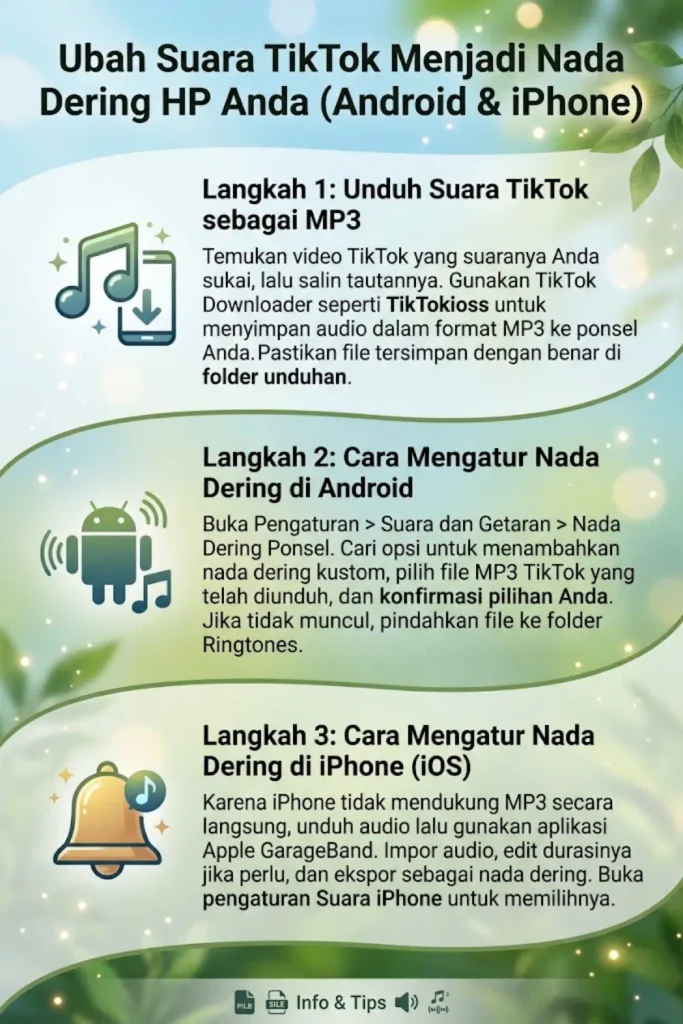
You can copy the TikTok video link and use a compatible TikTok downloader to save the audio If the service supports MP3 extraction you can download the sound directly as an audio file
Things you may need include
- A TikTok video containing the desired sound
- The TikTok video link
- An Android phone or iPhone
- A stable internet connection
- An MP3 audio file
- A ringtone or file management option depending on your device
Remember that some TikTok sounds may have copyright restrictions Download and use audio only when you have the right or permission to use it
Baca Juga: TikTokio Downloader – Unduh Video TikTok dengan Cepat & Gratis Tanpa Watermark dalam Kualitas HD
How to Download a TikTok Sound as MP3?
The first step is getting the sound onto your phone Open TikTok and find the video containing the audio you want to use
Copy the video link and open a TikTok downloader that supports audio extraction With TikTokioss you can paste the copied link and choose the available audio option when supported
Steps to Download the Audio
- Open TikTok on your phone
- Find the video with the sound you want
- Tap the Share button
- Select Copy Link
- Open TikTokioss in your browser
- Paste the TikTok link into the downloader
- Select the MP3 or audio option if available
- Start the download
- Check your Downloads or Files folder
The downloaded file can then be used for the ringtone setup The exact file location may vary depending on your browser phone model and operating system
Baca Juga: TikTokio Story Downloader: Unduh TikTok Stories Without Watermark dalam Kualitas HD Secara Gratis
How to Set a TikTok Sound as a Ringtone on Android?
Android phones generally allow users to select audio files stored on the device as custom ringtones The exact menu names can be different between Samsung Xiaomi Google Pixel OnePlus and other Android devices
First make sure the MP3 file is saved on your phone If you cannot find it open the Files or File Manager app and check the Downloads folder
Android Ringtone Steps
- Open Settings
- Go to Sound and vibration or a similar sound option
- Tap Phone ringtone
- Look for an option such as Add ringtone or My Sounds
- Select the downloaded MP3 file
- Choose the sound as your ringtone
- Save the setting if your phone asks for confirmation
On some Android phones you may need to move the MP3 file into the Ringtones folder first After moving the file return to the ringtone settings and check the available sounds again
Baca Juga: TikTok MP4 – Unduh Video TikTok dalam Format MP4 HD
If the MP3 Does Not Appear on Android
If your downloaded TikTok sound does not appear in the ringtone list try these steps
- Open the Files app and confirm the file exists
- Check that the file is actually an audio file
- Move it to the Ringtones folder
- Restart the phone
- Check the ringtone settings again
- Try another supported audio format if your phone does not recognize the file
The steps can differ between Android versions so the names of settings may not be identical on every device
How to Set a TikTok Sound as a Ringtone on iPhone
The process is different on iPhone because iOS does not normally allow an MP3 file to be selected directly from the ringtone settings like many Android phones
A common method is to use Apple’s GarageBand app to create a ringtone from an audio file saved on the iPhone
iPhone Ringtone Steps
- Download the TikTok audio to your iPhone
- Open GarageBand
- Create a new audio project
- Import the downloaded audio file
- Trim the section you want to use as the ringtone
- Export the project as a ringtone
- Give the ringtone a name
- Open the iPhone ringtone settings
- Select the newly created ringtone
The exact GarageBand interface can change with app updates but the general process remains similar
Baca Juga: TikTokio Com Download: Download Vídeos do TikTok Without Watermark in HD for Free
How to Use GarageBand for a TikTok Ringtone?
GarageBand is useful when you want to turn an audio file into an iPhone ringtone without directly selecting an MP3 from the standard ringtone settings
After importing the audio you can choose the specific section you want to use This is useful when the TikTok sound contains a long introduction or unwanted parts
Keep the ringtone short and select the most recognizable section Once the audio is ready use GarageBand’s ringtone export option and then select it from the iPhone sound settings
How Long Should a TikTok Ringtone Be?
A ringtone usually works better when it contains a short recognizable part of the sound You do not necessarily need the entire TikTok audio
A short clip can also make it easier to identify the ringtone when your phone rings
Consider these points
- Choose the most recognizable part of the sound
- Remove unnecessary silence
- Avoid very long audio clips
- Check the volume before setting it
- Listen to the final ringtone before using it
Can You Set Any TikTok Sound as a Ringtone
Not every TikTok sound will work in exactly the same way Some sounds may be restricted unavailable for download or protected by copyright
The technical process also depends on the device and the audio file you have available
If a sound cannot be downloaded or converted you should not attempt to bypass restrictions Use sounds that you are legally allowed to save and use.
Baca Juga: TikTokio Com Pengunduh Video TikTok Gratis Tanpa Watermark
TikTok Sound Ringtone Not Working
Sometimes the downloaded sound may work as an audio file but fail to appear as a ringtone This is usually related to file location format device settings or the ringtone creation process
Try checking the following
- Make sure the audio file downloaded correctly
- Confirm the file opens normally
- Check the file format
- Move the file to the Ringtones folder on Android
- Recreate the ringtone through GarageBand on iPhone
- Restart the device
- Check the ringtone volume
- Make sure another ringtone is not selected
If the problem continues try using a different audio file to determine whether the issue is related to the sound or the phone
Why Use TikTokioss for TikTok Audio?
TikTokioss is a web based downloader that can be accessed through a browser without requiring a TikTok password or account login
You can copy a TikTok video link and paste it into the downloader When audio extraction is available you can use the available MP3 option to save the audio for supported personal uses
The availability of downloads can depend on the original TikTok content source internet connection and current service conditions
Android vs iPhone TikTok Ringtone Setup
| Feature | Android | iPhone |
|---|---|---|
| Download TikTok audio | Browser | Browser |
| MP3 file support | Generally straightforward | Usually requires ringtone creation |
| Custom ringtone | Direct file selection on many devices | GarageBand or another supported workflow |
| File management | Files or File Manager | Files app |
| Settings | Sound and vibration | Sounds and Haptics |
The exact steps can vary depending on the phone model operating system version and installed apps
Tips for Better TikTok Ringtones
Choosing the right audio clip can make the final ringtone much better A sound that is clear and recognizable usually works better than a long recording
Before setting the ringtone consider these simple tips
- Select a clear part of the TikTok sound
- Avoid clips with long silence
- Check the audio volume
- Keep a backup of the original file
- Use legal and permitted audio
- Test the ringtone after setting it
- Delete unwanted audio files to save storage
Baca Juga: TikTokio Free dan Unlimited TikTok Video Downloader – Panduan Langkah demi Langkah
Frequently Asked Questions
Can I set a TikTok sound as my ringtone?
Yes You can save an appropriate TikTok audio file and use it as a custom ringtone The exact process depends on whether you use Android or iPhone
How do I download a TikTok sound as MP3?
Copy the TikTok video link and use a compatible audio downloader If MP3 extraction is available select the audio option and save the resulting file
Can I set a TikTok sound as a ringtone on Android?
Yes Many Android phones allow you to select an audio file from your device as a custom ringtone You may need to move the file to the Ringtones folder
Can I use a TikTok sound as an iPhone ringtone?
Yes but the process is different from Android You can use GarageBand to create a ringtone from a compatible audio file
Why is my TikTok sound not showing in ringtone settings?
The file may be in the wrong folder or format On Android moving it to the Ringtones folder can help On iPhone you normally need to create and export the ringtone through a supported workflow
Is TikTok audio free to use as a ringtone?
Not necessarily TikTok sounds can have copyright or usage restrictions Make sure you have the necessary rights or permission before using downloaded audio
Final Words
Setting a TikTok sound as a ringtone is possible on both Android and iPhone but the steps are different Android often allows direct selection of an audio file while iPhone generally requires a ringtone creation process such as GarageBand
The first step is to save the appropriate TikTok audio file Once the audio is available on your phone you can follow the device specific ringtone steps and choose the sound you want to hear whenever your phone rings.
Baca Juga: Tiktokio.com download untuk TikTok Video MP3 dan Story Gratis Tanpa Aplikasi